By default, some versions of OSX do not allow installation of programs unless they were distributed by Apple. You need to change these settings to install SPSS.
Click on the Apple icon in the top left corner of your screen and choose System Preferences.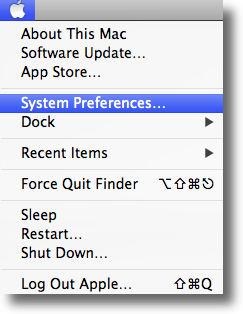
Next, click on Security & Privacy icon.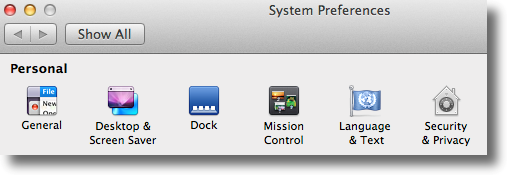
To edit the security settings, you must first click the padlock icon in the bottom left of the window.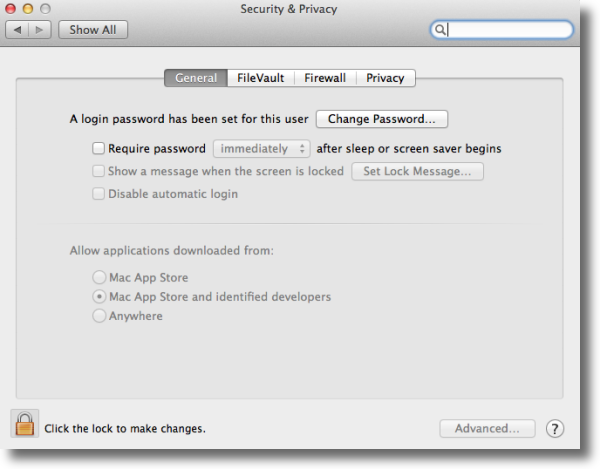
You will be asked to confirm your Mac credentials, just enter them and hit Unlock.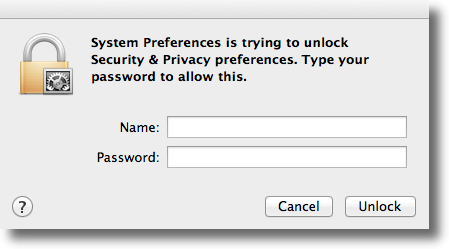
On the following screen, you'll see the options for "Allow applications downloaded from", you need to click on the "Anywhere" radio button, once you click that you will see a confirmation window, click on "Allow From Anywhere"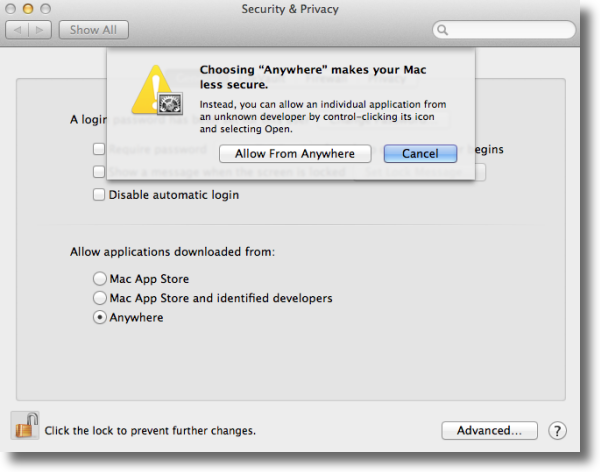

Free Shiping
From all orders over $100

Free Return Plolicy
Return money within 30 days

Secure Shopping
Youre in safe hands

More Than 1000 Products
We have everything you need
